How to Improve Your Online Bios: 6 Tips | The Startup Magazine

Your website and social media bios could use a facelift. These blurbs are among the first results most people see when searching your name online. They’re unlikely to include negative information unless you have a self-destructive streak, but that doesn’t mean you shouldn’t work as hard as possible to make your online bio as attractive as possible.

Your career and reputation could depend on it.
Improving your online bios and “about” pages won’t take hours upon hours of your time. Once you know what you need to say and how to say it, the process should go quickly. To get started, follow these six proven tips.

Get to the Point in the First Two Sentences

Short and sweet: that’s the online bio mantra. Get to the point in the first two sentences: name, current title, location, specialty. Anything else can wait until the second paragraph and beyond, including the happy but less-important details about your family, early life, and education.
Read More

6 Signs It’s Time to Give Your Website a Facelift | The Startup Magazine

In today’s competitive and constantly evolving business climate, a strong web presence is crucial. Your website is one of the most reliable, effective and future-proof marketing assets you can have. It should be set up to make access to information simple and immediate. A well-constructed website design that is easy to navigate and engages potential customers ensures you give a wonderful first impression.

Website design and underlying technology is always progressing. It is important to make changes to your website to stay current with competitors and improve business. Simple layouts, content management, comfortably followed navigation, and attractive aesthetics are fundamentals to keep in mind when freshening up a website for business.

In most cases, users judge a business’s credibility by their website. As such, it’s imperative that your website catches and keeps their attention. Here are six important signs that the time has come to update your site.

Read More

4 Ways Your Website Should Change Over the Next 5 Years | Entrepreneur

Updating your website involves more than just rearranging words and pictures on the homepage. Changing your website involves implementing new technology behind the scenes, eliminating dot-com domains and using research to optimize pages to capture your audience’s attention. Just think about your website two, five, 10 years ago. Chances are, it looked quite a bit different from the version you have today.

Read More

Why Your Website Needs a Storyteller Instead of a Designer | Duct Tape Marketing

Your website is the hub of your online presence – period. (Well, maybe that’s not exactly true from you right now, but it must be!)

As such, it has to do some heavy lifting and that heavy lifting must extend far beyond the interactive brochure still built today by many business owners.

Your website must tell a story. A story must be engaging and there must be a hero, a problem, a quest, a call to arms, and a promise of a happy ending.

The trouble with most sites, however, stems to some degree from how the web design industry is viewed.

A business creates a great product or service, develops the processes for marketing said product or service and then turns to a designer to create a gorgeous set of web pages to showcase it.

At some point, they determine they are going to need lots of pretty words to go with that awesome design, and then eventually they will need someone to “SEO it all.”

Of course, today the path described above is a recipe for disaster and waste.

Read More

Netflix To Roll Out A New, More Immersive Web Interface Starting In June | TechCrunch

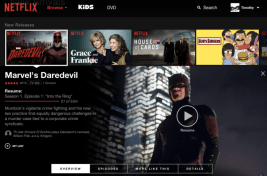
Netflix confirms today that it will roll out a new user interface on the web to all users worldwide beginning next month. A number of Netflix customers are already seeing the updated look-and-feel, however, according to various reports. The interface, which was previously demonstrated at CES and Mobile World Congress, brings the design of Netflix’s website more in line with what users today see on mobile phones, tablets, on gaming consoles and on other streaming media players, like Roku.

The most notable aspect to the new design is that it eliminates the slower, scrolling carousels for content discovery in favor of an updated look with larger thumbnails in each section which can be clicked on in order to expand a detail screen showing additional information about the title in question.

Read More.

12 Point Checklist For Creating a Website | Smallbiztrends

creating-a-website-660x369Creating a website can be daunting. Same goes for updating or improving your existing website. It feels like a huge project. You may feel like you don’t know where to start.

The good news is, with the right help and the right tools, creating a website is a very manageable process today.

And it all starts with a good plan. To get started, think through what you need to do. Start making notes to keep track.

The following website checklist, provided courtesy of Verisign, will guide you as you consider key issues and what is involved.

Read More.